
 The Process Log, to differentiate from the Audit Log, is used to log the technical processes inside MailStore Cloud, e.g. a directory service synchronization. Only a user with the “Admin” role can see the Process Log.
Process Log
The Process Log page has various features that can be used to search and manage processes.
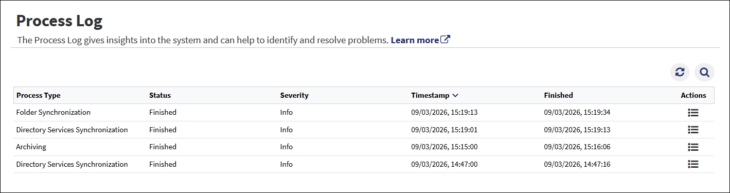
- Search – The process log can be searched and filtered by different criteria.
- Process Type – Filters on a specific process type.
- Request ID – Each process has a unique request ID, which can be searched for.
- Minimum severity – Filters on the minimum severity, e.g. a search with minimum severity “Warning” will show warnings and errors.
- Timestamp – The start time of the process.
- Finished – The time when the top level process has finished.
- Refresh – The refresh icon can be utilized if needed to refresh the page.
- Actions – Allows you to view the details and messages (sub entries) of a process log entry.
Process Details
Note:
- The details view has a Copy button that copies the process data as JSON into the clipboard (e.g. to mail it to support).
- It also includes a Resolve button (eye icon) that converts IDs into readable names. You can use the Resolve All button at the top to resolve all IDs at once, or click the resolve icon next to a specific ID to resolve only that entry.
- For processes containing a large number of IDs, the Resolve All operation may take some time to complete.
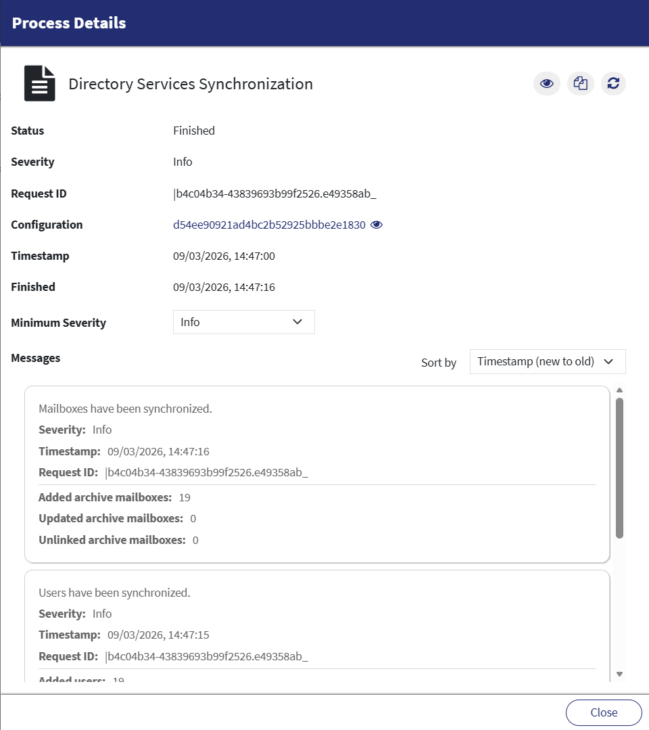
- Status – The status of the top level process. If the status is not “Finished”, the process can be cancelled here.
- To cancel the emptying of an archive mailbox, you have to go the “Archive Mailboxes” page.
- Severity – The maximum severity level that occurred in this process.
- Note: When a connection error occurs, you can navigate to the corresponding configuration and use the ‘Test connection’ button to see more details.
- Request ID – Each process has a unique request ID.
- Configuration – The ID of the configuration related to this process. Can be searched for in the according list view, e.g. in the directory services list.
- Timestamp – The start time of the process.
- Finished – The time when the top level process has finished.
- Note: Although the top level process has finished, sub processes can still be running. Their messages will continue to be added to the messages list of the top level process.
- Minimum Severity – The minimum severity to be shown in the messages list. A minimum severity of “Warning” will show warnings and errors.
- Messages – A list of messages generated by the top level process or its sub processes.
- Note: The messages show more details on the progress of the process.