




Starting with MailStore V26.2: Easy Migration to the Graph API and IMAP for Microsoft 365 Users
Background: Shutdown of EWS
As previously announced in our blog post in January, Microsoft plans to discontinue its Exchange Web Services (EWS) for Microsoft 365. The phase-out will begin on October 1, 2026, and is expected to be fully completed by April 2027.
For businesses, this means that any processes still relying on EWS must be migrated to the Microsoft Graph API as soon as possible. Once Microsoft permanently disables EWS, older MailStore profiles that still use EWS for archiving or exporting will no longer work.
MailStore is here to support you through the transition as best as possible. Specifically, with Release 26.2 (April 29) and a new, integrated conversion tool that includes warning mechanisms and wizards.
New in MailStore Starting With Release 26.2 (April 29)
Release 26.2 (April 29) includes all the features that MailStore Server and MailStore SPE customers need for migrating to the Graph API. This release offers features such as automatic detection, clear instructions, and a guided migration process via the new profile conversion tool.
Users will find the following new features within the software:
1. Automatic Identification & Warning for EWS Profiles
MailStore now clearly indicates when EWS-based archiving or export profiles are still present – both:
- in the Admin Dashboard
- directly within the respective profile
- in the status report
Clicking the warning launches the Microsoft 365 Profile Conversion Tool.

2. Profile Conversion Tool
The new wizard guides administrators step by step through the conversion process. At a glance, you can see whether a profile:
- can be converted (“automatic”),
- has already been successfully converted (“not required”), or
- cannot be converted for technical reasons (“not supported”)
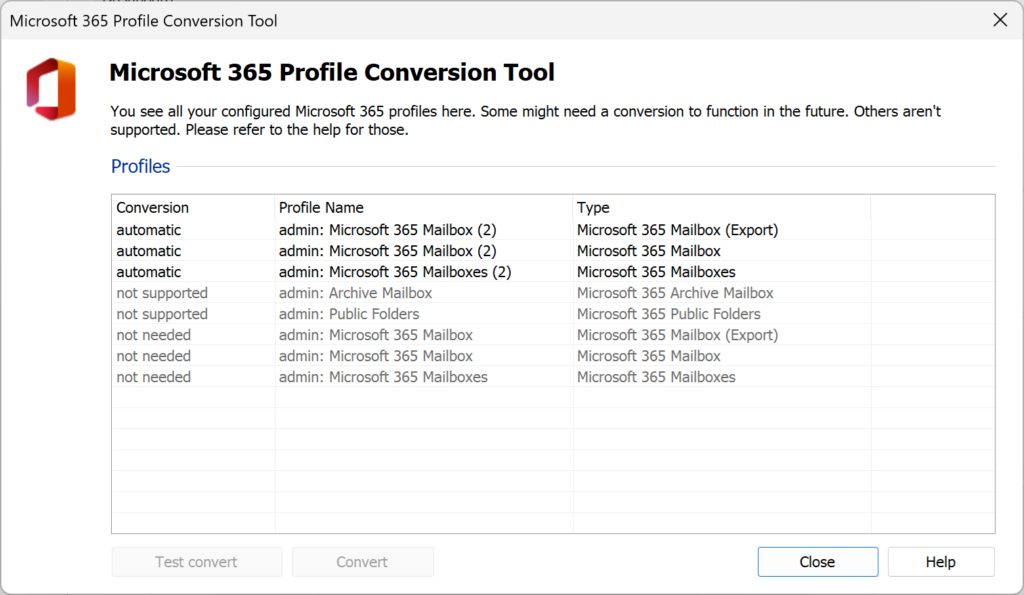
3. “Test Conversion” – Identify Issues Before They Occur
Before the actual migration, administrators can check the following with a single click:
- Are the required connections available?
- Are the permissions set correctly?
The integrated help section provides direct access to troubleshooting tips.
4. New Export Profiles Now Use IMAP
Export profiles have also been updated: Instead of EWS, IMAP will be used going forward to ensure that the correct emails are reliably saved in their original folders in the archive.
Important: Update Microsoft Permissions
Before the actual migration can be performed, additional API permissions must be set in Microsoft Entra ID. These are mandatory prerequisites for the new archiving mechanisms. Once these permissions have been granted, the conversion can be performed automatically using the profile conversion tool.
Here is a summary of the steps:
- Update API permissions in Microsoft Entra ID
- Launch the MailStore conversion tool
- Successfully complete the conversion
You can find more details on this in our Help section.
Related posts