
 A mailbox consists of a primary and optional secondary email addresses and contains all emails archived from the email addresses. Mailboxes can be assigned to users and groups. While a user assigned to a mailbox is considered as the owner of the mailbox, a group is always considered as ‘shared users’ and will see this mailboxes under ‘Shares’.
Archive Mailboxes
The Archive Mailboxes page has various features that can be used to create and manage mailboxes. The list view displays mailboxes via email in ascending or descending order. It also displays the Directory service, Imported status and the mail count.
Note: Mail count is the amount of unique mails and does not count duplicate mails. It is updated every 60 minutes.
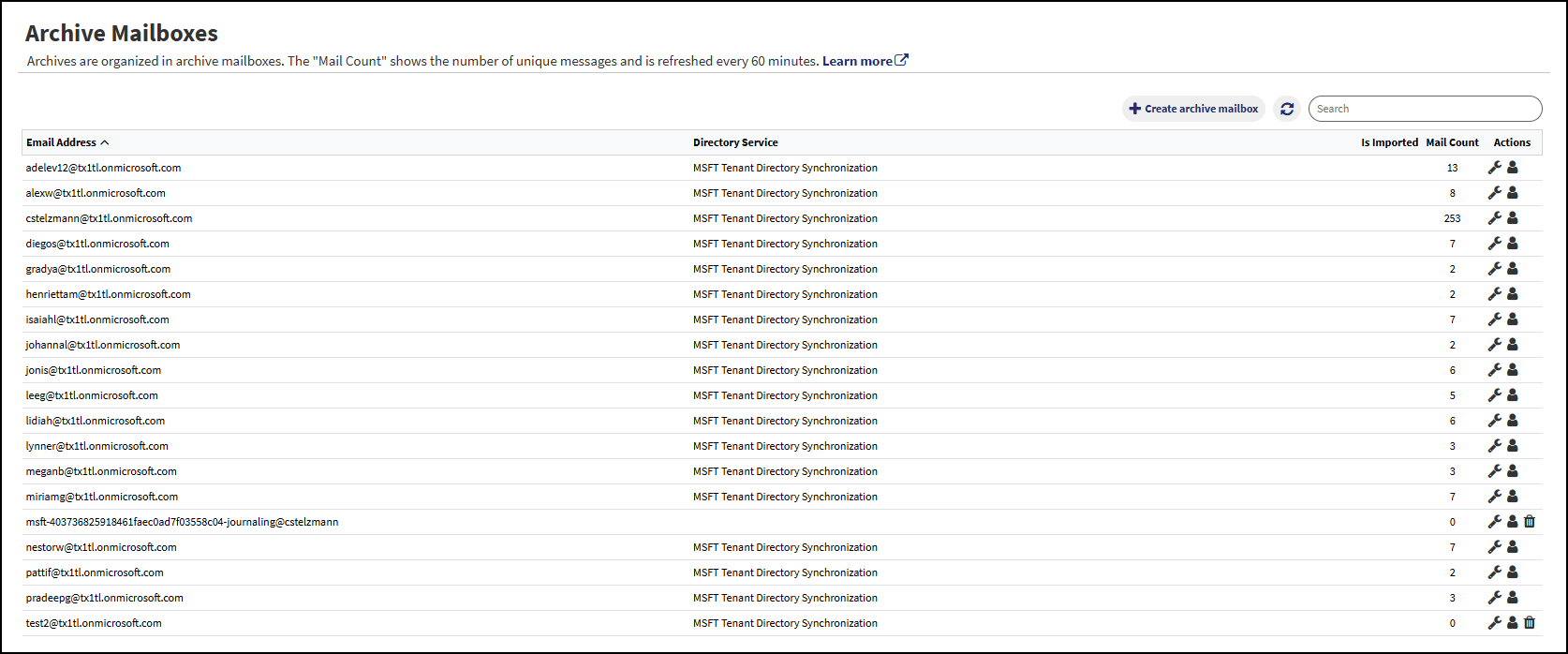
- Create archive mailbox – Creates a new mailbox.
- Refresh – The refresh icon can be utilized if needed to refresh the page.
- Search – An implicit search over using Name, Directory Service, and ID:
- Names and Directory Service are case insensitive “includes” searches.
- ID is a case insensitive “equals” search
- Actions
- Edit – Editing secondary email addresses.
- Manage users and groups – Manages mailbox permissions for users and groups.
- Delete – Depending on your user roles and whether or not the archive mailbox contains mails, a delete icon will be displayed. See below for a detailed description of the archive mailbox deletion process.
Create/Edit

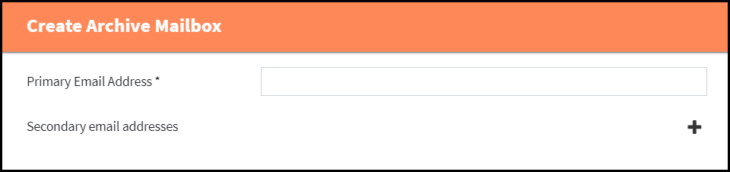
- Primary Email Address (must be a valid email address if form of ‘name@domain’).
- Secondary Email Addresses (must be valid email addresses if form of ‘name@domain’).
- For mailboxes that are associated with a directory service, only secondary mail addresses can be edited.
Manage Users or Groups
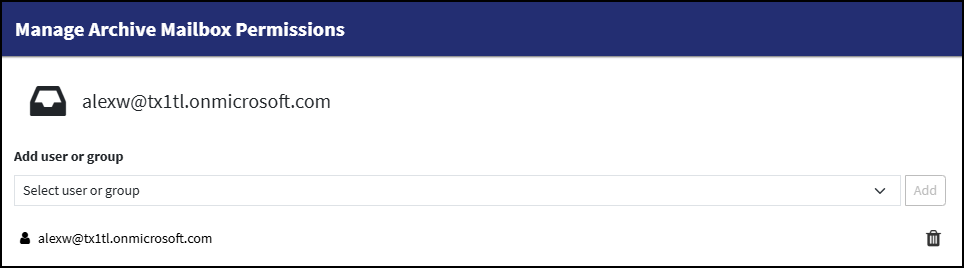
- Add users or groups.
- Users will become owners of the mailbox.
- Groups will see the content of the mailbox as ‘Shared mailbox’.
- Remove users or groups.
Deleting an Archive Mailbox
The permission to delete an archive mailbox depends on the roles a user has:
- Users with role “Administrator” are only allowed to delete empty archive mailboxes.
- Users with role “Compliance” are also allowed to delete non-empty archive mailboxes.
The icon for the delete action is displayed depending on the mail count seen in the archive mailbox table and the user’s roles.
Deleting an Empty Archive Mailbox
When the delete action is performed on an archive mailbox that is displayed as empty, first the actual (non-cached) mail count of that archive mailbox will be determined. If the archive mailbox is actually not empty, users with role “Compliance” will be shown the dialog for deleting non-empty archive mailboxes (see below). Other users will see a messages denying the operation.
Once an archive mailbox is marked for deletion, it will not be deleted immediately as there might still be background processes adding mails to the archive mailbox. The mail count of the archive mailbox will be checked once every 24h and the archive mailbox will be finally deleted if it was empty for 24h at the time of checking the mail count. During this period, the deletion request can be revoked by clicking the lifebuoy icon.
Deleting a Non-Empty Archive Mailbox
When trying to delete a non-empty archive mailbox as user with role “Compliance”, you are presented with several options on how to handle the emails contained in that archive mailbox.
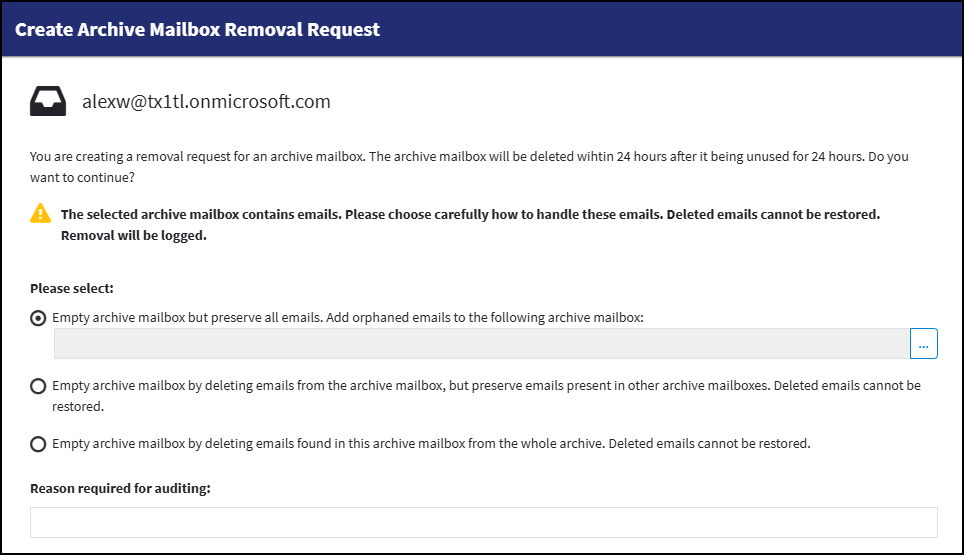
The following options exist, from top to bottom:
- Remove the link of emails to the archive mailbox that is to be deleted. Emails that would not have a connection to any other archive mailbox after that (“orphaned” emails) will be assigned to a user-selectable archive mailbox as fallback.
- With this option, all emails will be preserved and no email will be deleted from the archive.
- Delete emails from the archive that are only present in the to be deleted archive mailbox but in no other archive mailbox. Emails that are present in other archive mailboxes will remain available in those archive mailboxes.
- Emails that are deleted because they were only linked to the to be deleted archive mailbox can not be restored!
- This option is inactive if legal hold is active.
- Delete emails not only from the to be deleted archive mailbox but from the whole archive. Every email that is present in the to be deleted archive mailbox will be deleted from the whole archive regardless of if it is also available in other archive mailbox.
- The deleted emails (all emails in this archive mailbox) cannot be restored!
- This option is inactive if legal hold is active.
After giving a reason for auditing (required input), the process can be started. The dialog will be closed and the archive mailbox will be shown as “marked for deletion” in the list view.
- A background process will start to empty the archive mailbox according to the option chosen by the user.
- The progress of emptying the archive mailbox will be shown in the process log.
- To cancel the process, go to the archive mailbox list view and click the lifebuoy icon.
- Depending on the selected emptying option and the current phase of the process, emptying of the archive mailbox cannot be canceled or cancellation will be delayed.
- Cancelling the process will also remove the “marked for deletion” flag from the archive mailbox.
Once the process of emptying the archive mailbox is finished, it is treated as an empty archive mailbox marked for deletion. Refer to the previous section for further information.