
 The dashboard is the first stop for administrators to check on their MailStore Cloud tenant. It provides helpful hints, statistics and links to useful websites.
Dashboard
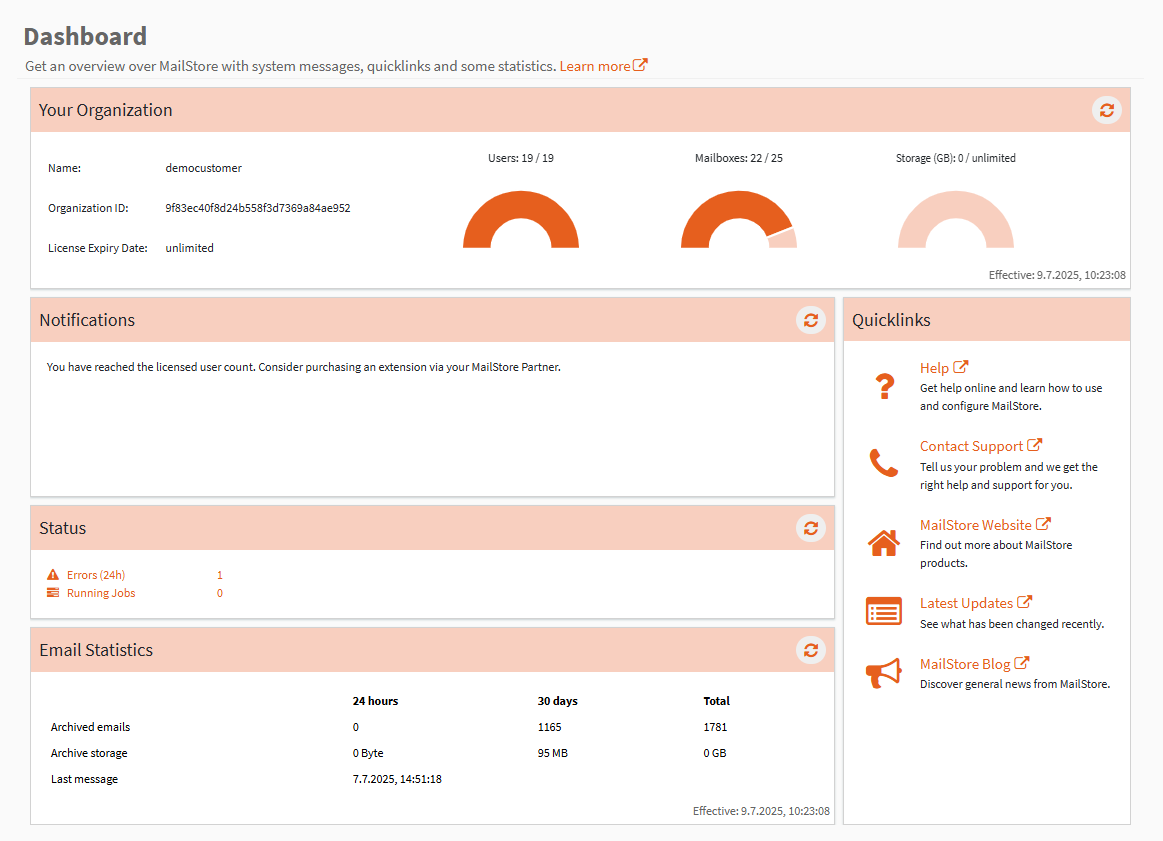
The dashboard consists of several sections:
- Your Organization:
- Information about your organization, like its name, its ID and the license expiry date is displayed.
- You can also see the quotas for users, mailboxes and storage and how much of it is already used.
- The data can be up to an hour old, the last time it was gathered is displayed.
- Notifications:
- Notifications consist of hints about possible inconsistent or missing configurations, and links to the sections of the Admin Access that here helpful to resolve those issues.
- Status:
- This shows the number of running jobs as well as the number of jobs that reported an error in the last 24 hours.
- Even if all jobs are finished, depending actions (like indexing after archiving) may still be executed.
- The links lead to their respective Process Log, which may be filtered for errors.
- This shows the number of running jobs as well as the number of jobs that reported an error in the last 24 hours.
- E-mail Statistics:
- Statistics about the mails that were archived in the last 24 hours, the last 30 days, or all time.
- The data can be up to an hour old, the last time it was gathered is displayed.
- Quicklinks:
- Links to MailStore websites that are helpful for both resolving concrete issues or just getting general information about MailStore Cloud and MailStore.
Calculation of Used Storage
- Used Storage is the total uncompressed size of all your organization’s mails that are saved in MailStore Cloud.
- Ingested mails are deduplicated so that multiple instances of the same mail do not use additional storage and count towards the total size only once.
- An exception to this are mails that were migrated from MailStore on-premise products (e.g. MailStore Server). Those are not deduplicated against archived mails, but only against other migrated mails.
- Since archived mails can be associated to multiple mailboxes at once, it is possible that the total storage required is lower than the total size of all archive mailboxes.
- Storage sizes are rounded down to their respective units, e.g. 95 MB will be displayed as 0 GB.